Local AI with Strix Halo & R9700, Part 2: Writing Our Own Engine
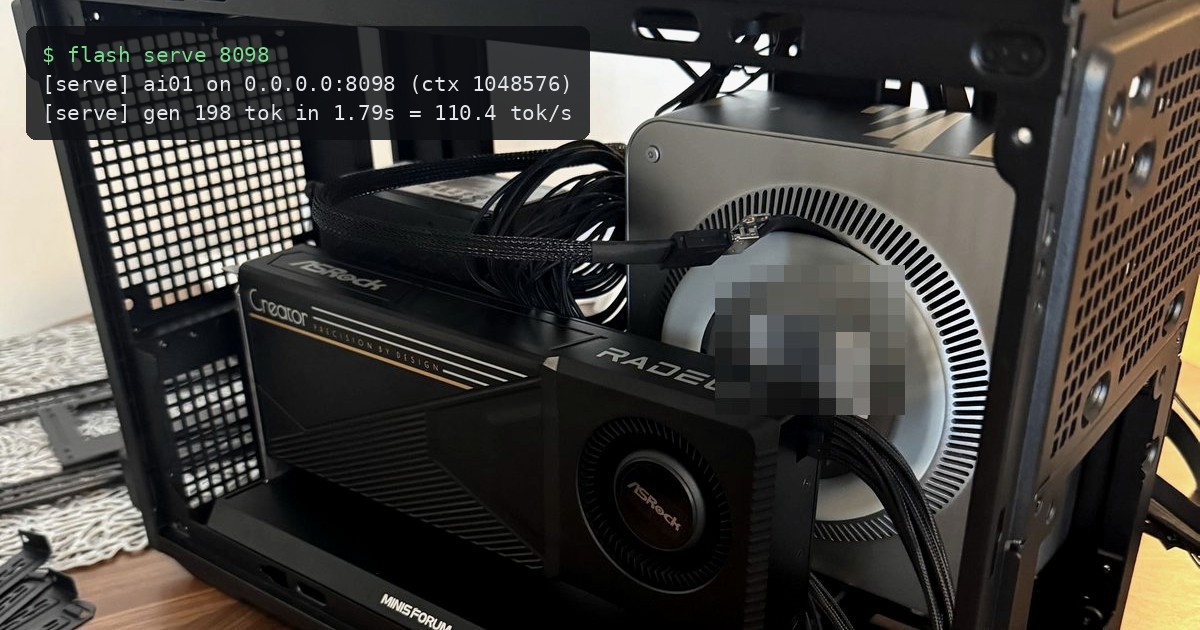
In the last post I built a Strix Halo + R9700 box and early results were a bit disappointing - splitting one model across both GPUs didn’t really pay off as I hoped. Qwen3.8-Flash-Next (125B-A6B MoE) ran at about 30 t/s on the Strix Halo iGPU alone, and every split lost at long context because the attention path crossed the OCuLink x4 link every token.
I wanted to get better performance (ultimately for vulnerability research), so I (who are we kidding - mostly Claude) wrote a dedicated engine for exactly this hardware. It’s called strixpro, and it now runs Qwen3.8-Flash-Next at ~100 t/s on short prompts and over 70 t/s at a 1M-token context, with both the GPU and the Strix Halo power-capped so the box stays quiet. Don’t underestimate the noise these tiny PCs can make - capping both the GPU and CPU/iGPU is really the only way to make this bearable imo.
Model
Qwen3.8-Flash-Next is an interesting architecture to build for:
- 48 layers, mostly Gated DeltaNet (linear attention with a recurrent state), with full attention only in every 4th layer
- 512 routed experts per layer, of which 10 are active per token, plus a shared expert
- a sparse attention indexer in the attention layers: each query only reads the top 512 blocks of 4 tokens it scores highest, which is what makes long context cheap
- a built-in MTP head that drafts the next tokens for speculative decoding
- a 51 GB n-gram embedding table that is looked up per token (it stays on disk; only 16 rows are read per token)
Only ~6B of the 125B parameters are touched per token, but which 6B changes every token - so the question is where the 120B of expert weights live.
Splitting the model across both GPUs
The idea is the same one Lucebox used for DeepSeek: the R9700 is fast (640 GB/s) but small (32 GB), the Strix Halo is slower but big (128 GB). So:
- The R9700 runs the “trunk” (attention, DeltaNet, shared experts, the indexer, the output head) plus the most frequently routed experts. Which ones is decided by a routing profile: running ~190 of the 512 experts per layer on the R9700 covers about 75% of all expert calls.
- The Strix Halo holds all 512 experts per layer and computes the ones that are not hot, in parallel with the R9700.
- Every layer, the cold experts’ inputs go over to the Strix and the results come back through pinned host memory. Since the Strix shares memory with the CPU, this is cheap - the OCuLink link only carries a few KB per layer, not weights.
At a 1M-token context the K/V cache (26 GB) doesn’t fit on the R9700 anymore, so it moves into Strix memory and attention over the selected tokens runs there too.
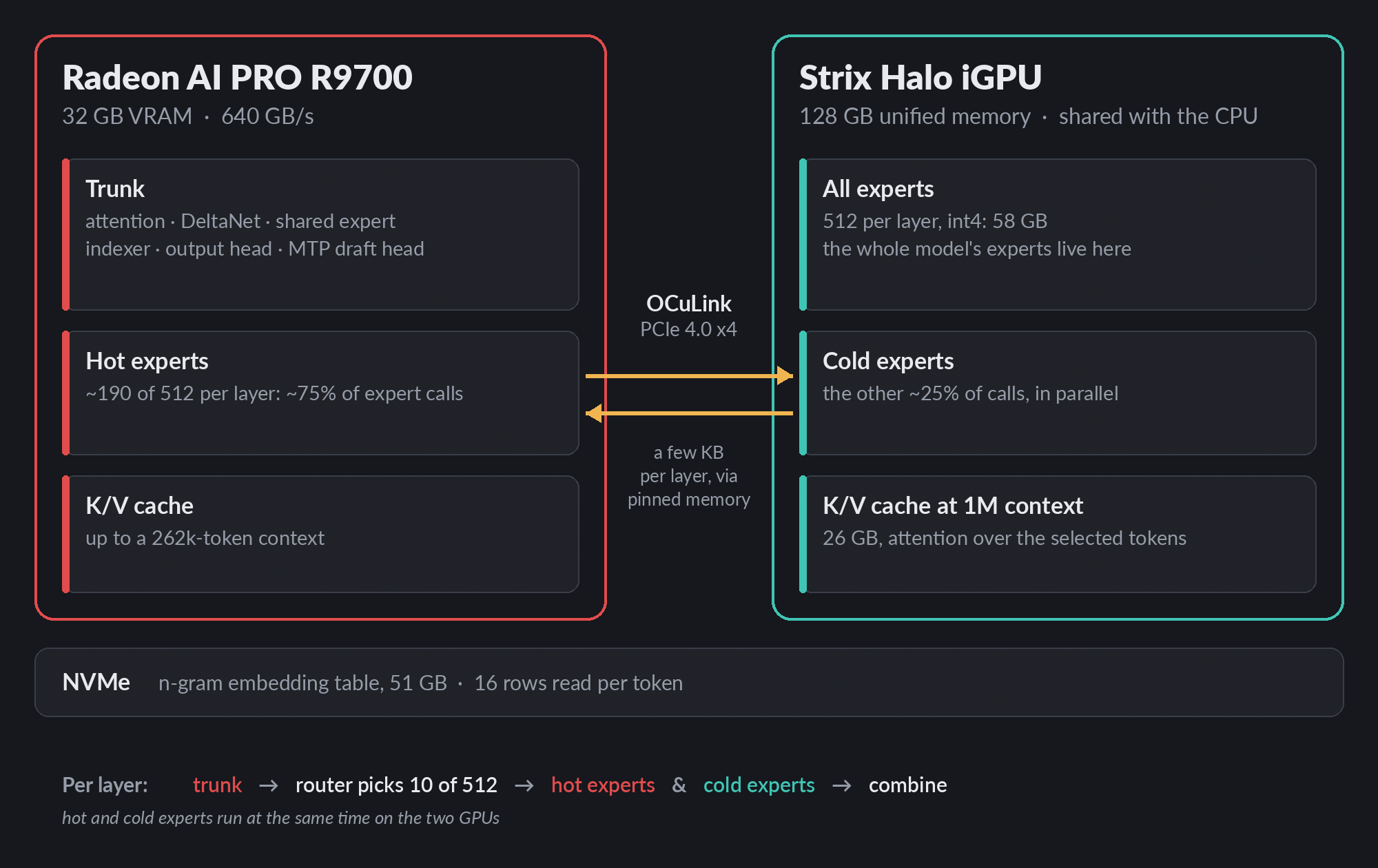 The split: the trunk and the most-used experts on the R9700, every expert on the Strix Halo, and only a few KB per layer over OCuLink.
Custom quantization
The weights come from the original bf16 checkpoint through our own converter, into our own format (standard safetensors with custom encodings):
| what | encoding | bits/weight |
|---|---|---|
| routed experts (58 GB) | Hadamard-rotated int4, scale per 128 | 4.1 |
| attention/DeltaNet projections, output head | 6-bit, scale + min per 64 | 6.5 |
| embedding, small projections | 4-bit codebook | 4.5 |
| norms, router | bf16 | 16 |
Because the converter works from any bf16 checkpoint with this architecture, fine-tunes work too. I tried Orcarouter’s abliterated version and Blackfrost AI’s CYBER-FROST. Converting a new fine-tune takes a few hours. Eventually my goal is creating my own, custom fine-tune model.
Results
Decode, R9700 capped at 210 W, MTP depth 3 + prompt lookup:
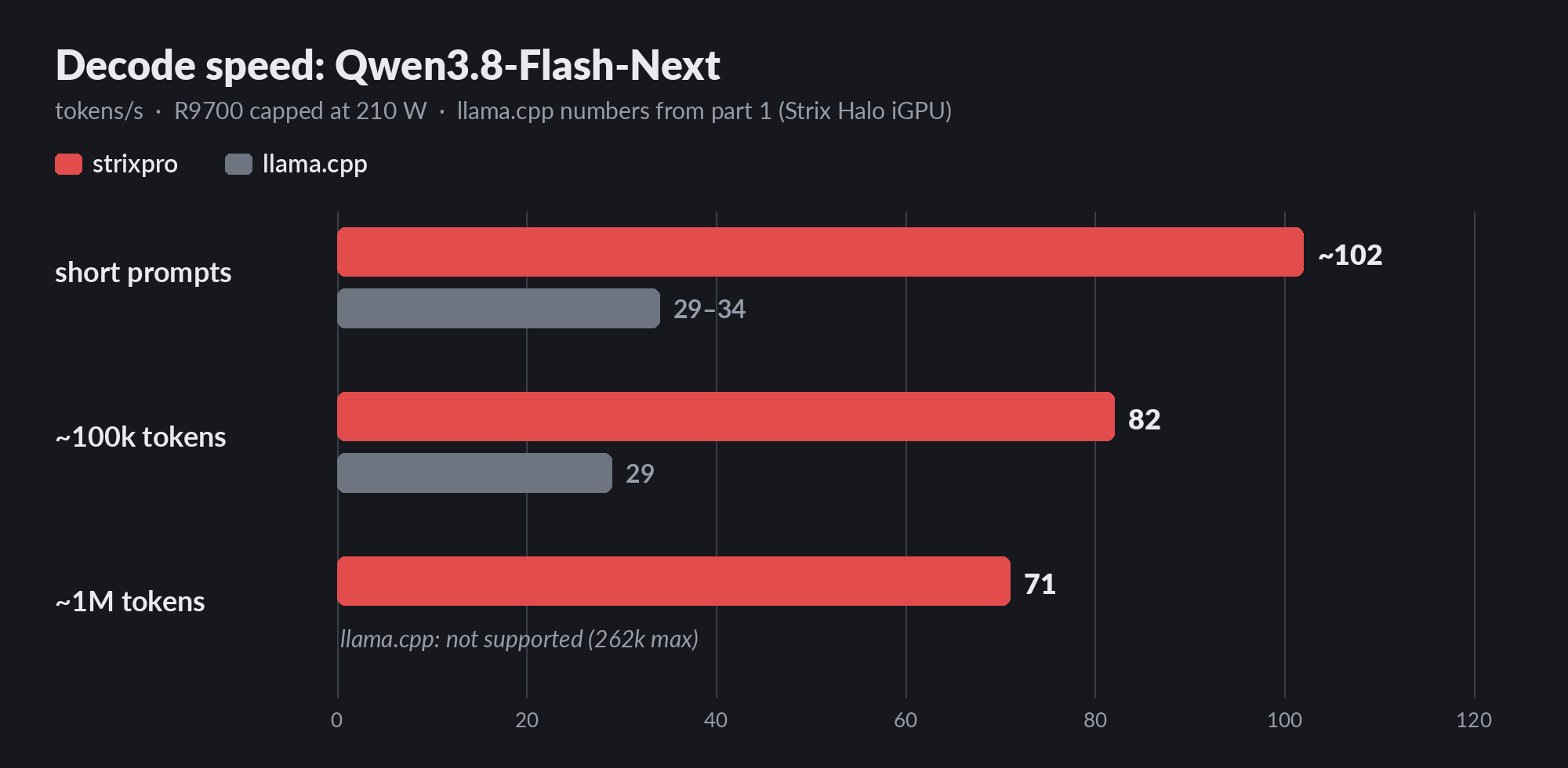 strixpro on both GPUs vs. llama.cpp on the Strix Halo iGPU from the last post.
| context | strixpro | llama.cpp (last post) |
|---|---|---|
| short prompts | ~102 t/s | 29-34 t/s (iGPU only) |
| ~100k tokens | 82 t/s | 29 t/s (107k) |
| ~980k tokens | 71 t/s | - (262k max) |
Prefill runs at ~2,000 t/s on 4-16k prompts; a 979k-token prompt takes about 13 minutes. At 1M context the whole thing uses ~86 GB of system RAM.
It runs as an OpenAI-compatible server, so anything that speaks that API can use it.
Noise
Both chips need capping, not just the GPU - the Strix Halo’s CPU boost and iGPU clocks add to the noise in a case this small. The R9700 is the main source though: at long context it sits at its power cap the whole time and its blower ramps up to ~2100 rpm. 210 W is the lowest cap the driver accepts, so going further needs the card’s overdrive controls, which are off by default (amdgpu.ppfeaturemask=0xfff7ffff on the kernel command line - the default mask plus the overdrive bit).
| stock | what I run | |
|---|---|---|
| R9700 board power | 300 W | 210 W (the card’s minimum) |
| R9700 clock | stock | -500 MHz offset |
| R9700 fan | up to 5500 rpm | capped at 1500 rpm (+ a guard, see below) |
| Strix Halo iGPU clock | up to 2900 MHz | 2000 MHz max |
| Strix Halo CPU boost | on (up to 5.1 GHz) | off (3.0 GHz) |
Decode is mostly limited by memory bandwidth, so the clock offset costs almost nothing there; the fan cap takes the R9700 from ~2100 rpm to ~1200-1300 rpm under load, with the junction in the high 80s (the chip’s limit is 110 °C, a stock R9700 runs ~85 °C). The iGPU cap costs ~2.4% decode speed. All of it is sysfs (as root; check which cardN is which GPU on your system):
1
2
3
4
5
6
7
8
9
10
11
12
# R9700: board power cap, in microwatts
echo 210000000 > /sys/class/drm/card0/device/hwmon/hwmon*/power1_cap
# R9700 (needs the ppfeaturemask above): fan cap + clock offset, committed TOGETHER
echo manual > /sys/class/drm/card0/device/power_dpm_force_performance_level
echo 1500 > /sys/class/drm/card0/device/gpu_od/fan_ctrl/acoustic_limit_rpm_threshold
echo "s -500" > /sys/class/drm/card0/device/pp_od_clk_voltage
echo c > /sys/class/drm/card0/device/pp_od_clk_voltage
# Strix Halo iGPU: lower the top clock state, then commit
echo "s 1 2000" > /sys/class/drm/card1/device/pp_od_clk_voltage
echo c > /sys/class/drm/card1/device/pp_od_clk_voltage
# CPU boost off
echo 0 > /sys/devices/system/cpu/cpufreq/boost
What’s next
I’m going to run more real-world tasks (vulnerability research, exploit development) to get a better idea on the capabilities but so far its doing pretty well. Ive been solving plenty of challenges/machines with the local model without much issues.